跳至正文
i@laoer.com

技术、生活、感悟 -- Laoer的博客

i@laoer.com

技术、生活、感悟 -- Laoer的博客

  • 首页
  • 人工智能
  • 互联网
  • 商业观察
  • 天乙软件
  • 用药有数
  • 隐私政策
  • 关于
  • X
  • 首页
  • 人工智能
  • 互联网
  • 商业观察
  • 天乙软件
  • 用药有数
  • 隐私政策
  • 关于
  • X
关

搜索

  • 首页
  • 人工智能
  • 互联网
  • 商业观察
  • 天乙软件
  • 用药有数
  • 隐私政策
  • 关于
  • X
i@laoer.com

技术、生活、感悟 -- Laoer的博客

i@laoer.com

技术、生活、感悟 -- Laoer的博客

  • 首页
  • 人工智能
  • 互联网
  • 商业观察
  • 天乙软件
  • 用药有数
  • 隐私政策
  • 关于
  • X
  • 首页
  • 人工智能
  • 互联网
  • 商业观察
  • 天乙软件
  • 用药有数
  • 隐私政策
  • 关于
  • X
关

搜索

  • 首页
  • 人工智能
  • 互联网
  • 商业观察
  • 天乙软件
  • 用药有数
  • 隐私政策
  • 关于
  • X
PHPWeb2.0

用Google API来取得Google帐户的联系人列表

作者 Laoer
2009年3月12日 3 分钟阅读
1

昨天写了一篇从Web Mail里取得用户通讯录的方法的文章,里面提到了Google的Account Authentication API,今天我们就用Account Authentication API和Google Contacts Data API来做一个取得Google帐户联系人的测试。

首先我们要看一下Account Authentication API,对于网络应用来说我们选择对网络应用程序的验证,对网络应用程序的验证也提供了 OAuth 和 AuthSub 两种认证方式,我们选择AuthSub的认证方式,认证过程如下图
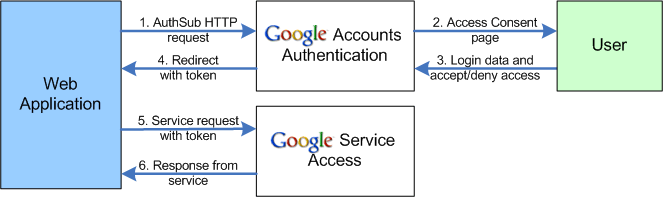
Google Authsub Diagram

用户在第三方Web应用上向Google Accounts Authentication发送AuthSub的HTTP请求,如果用户没有登录Google,则会显示登录页面,用户登录之后,会提示用户是否接受或拒绝这个第三方Web应用的访问请求,如果用户同意,Google就会生成一个token,转回第三方Web应用,第三方Web应用凭此token,可以请求Google的相关Sevice,比如联系人的服务,从而取得相关数据。

AuthSub有两种接口,一个是AuthSubRequest(A call to this method sends the user to a Google Accounts web page, where the user is given the opportunity to log in and grant Google account access to the web application. If successful, Google provides a single-use authentication token, which the web application can use to access the user’s Google service data.)另一个是AuthSubSessionToken(A call to this method allows the web application to exchange a single-use token for a session token),按照Google文档的理解,AuthSubRequest是一个单次的认证,AuthSubSessionToken应该是带会话(Session)的。

我们就举Google提供的例子

https://www.google.com/accounts/AuthSubRequest?
   next=http%3A%2F%2Fwww.yourwebapp.com%2Fshowcalendar.html
   &scope=http%3A%2F%2Fwww.google.com%2Fcalendar%2Ffeeds%2F
   &session=1
   &secure=1

https://www.google.com/accounts/AuthSubRequest就是AuthSub请求的地址,next表示认证之后要转回的地址,一般就是第三方Web应用的地址,也就是你网站的一个地址,Google会把token附带到这个地址后面,scope是你要请求的Google服务地址,这个例子里是要访问Google日历的数据,另外两个参数看Google的文档吧。

接下来,我们要取得Google帐户的联系人,我们先看看Google提供了多少可以访问的服务吧,访问Google数据API,Google提供的数据还着不少,有日历、文档、图书搜索、网路相册等等,当然也包括我们所需要的联系人的API,Google数据API要好好了解一下,总体来说Google提供一个Gdata的数据格式,和RSS的feed类似的格式,通过相关服务的访问地址,就可以返回Gdata数据,至于Gdata的读取,已经有了很多程序语言的封装好的程序(http://code.google.com/intl/zh-CN/apis/gdata/clientlibs.html),直接用就可以了,我们用PHP举例,PHP对Gdata的封装,是Zend Framework里的Gdata包,在http://framework.zend.com/download/gdata下载就可以了,但是现在Zend Gdata的包里没有直接的Google contacts的组件,但不要紧,通过Zend Gdata里基础数据的访问,可以取得Google contacts。

我们看看Google Contacts Data API的开发人员指南吧,取得联系人的Feed URL是

http://www.google.com/m8/feeds/contacts/userEmail/full 
或 
http://www.google.com/m8/feeds/contacts/default/full

那我们就用PHP来写一个取得联系人的程序吧

1
2
3
4
5
6
7
8
9
10
11
12
13
14
15
16
17
18
19
20
21
22
23
24
25
26
27
28
29
30
31
32
33
34
35
36
37
38
39
40
41
42
43
44
45
46
47
48
49
50
require_once 'Zend/Loader.php';
Zend_Loader::loadClass ( 'Zend_Gdata' );
Zend_Loader::loadClass ( 'Zend_Gdata_AuthSub' );
Zend_Loader::loadClass ( 'Zend_Gdata_ClientLogin' );
Zend_Loader::loadClass ( 'Zend_Gdata_Query' );
Zend_Loader::loadClass ( 'Zend_Gdata_Feed' );
 
$my_contacts = 'http://www.google.com/m8/feeds/contacts/default/full';
 
if (! isset ( $_SESSION ['cal_token'] )) {
	if (isset ( $_GET ['token'] )) {
		// You can convert the single-use token to a session token.
		$session_token = Zend_Gdata_AuthSub::getAuthSubSessionToken ( $_GET ['token'] );
		// Store the session token in our session.
		$_SESSION ['cal_token'] = $session_token;
	} else {
		// Display link to generate single-use token
		$googleUri = Zend_Gdata_AuthSub::getAuthSubTokenUri ( 'http://' . $_SERVER ['SERVER_NAME'] . $_SERVER ['REQUEST_URI'], $my_contacts, 0, 1 );
		echo "Click <a href='$googleUri'>here</a> " . "to authorize this application.";
		exit ();
	}
}
 
// Create an authenticated HTTP Client to talk to Google.
$client = Zend_Gdata_AuthSub::getHttpClient ( $_SESSION ['cal_token'] );
 
$gdata = new Zend_Gdata ( $client );
$query = new Zend_Gdata_Query ( $my_contacts );
//$query->setMaxResults(10);
$query->setMaxResults ( 2000 );
$feed = $gdata->getFeed ( $query );
 
foreach ( $feed as $entry ) {
 
	$parts = $entry->getExtensionElements ();
	foreach ( $parts as $p ) {
		$element = $p->getDOM ();
		switch ($element->tagName) {
			case 'email' :
				print ( "Email: " . $element->getAttribute ( 'address' ) . "<br/>" );
				break;
			case 'phoneNumber' :
				print ( "Phone: " . $element->nodeValue . "<br/>" );
				break;
			default :
				continue;
		}
	}
 
}

require_once 'Zend/Loader.php'; Zend_Loader::loadClass ( 'Zend_Gdata' ); Zend_Loader::loadClass ( 'Zend_Gdata_AuthSub' ); Zend_Loader::loadClass ( 'Zend_Gdata_ClientLogin' ); Zend_Loader::loadClass ( 'Zend_Gdata_Query' ); Zend_Loader::loadClass ( 'Zend_Gdata_Feed' ); $my_contacts = 'http://www.google.com/m8/feeds/contacts/default/full'; if (! isset ( $_SESSION ['cal_token'] )) { if (isset ( $_GET ['token'] )) { // You can convert the single-use token to a session token. $session_token = Zend_Gdata_AuthSub::getAuthSubSessionToken ( $_GET ['token'] ); // Store the session token in our session. $_SESSION ['cal_token'] = $session_token; } else { // Display link to generate single-use token $googleUri = Zend_Gdata_AuthSub::getAuthSubTokenUri ( 'http://' . $_SERVER ['SERVER_NAME'] . $_SERVER ['REQUEST_URI'], $my_contacts, 0, 1 ); echo "Click <a href='$googleUri'>here</a> " . "to authorize this application."; exit (); } } // Create an authenticated HTTP Client to talk to Google. $client = Zend_Gdata_AuthSub::getHttpClient ( $_SESSION ['cal_token'] ); $gdata = new Zend_Gdata ( $client ); $query = new Zend_Gdata_Query ( $my_contacts ); //$query->setMaxResults(10); $query->setMaxResults ( 2000 ); $feed = $gdata->getFeed ( $query ); foreach ( $feed as $entry ) { $parts = $entry->getExtensionElements (); foreach ( $parts as $p ) { $element = $p->getDOM (); switch ($element->tagName) { case 'email' : print ( "Email: " . $element->getAttribute ( 'address' ) . "<br/>" ); break; case 'phoneNumber' : print ( "Phone: " . $element->nodeValue . "<br/>" ); break; default : continue; } } }

放在你服务器上运行一下吧(别忘了Zend Gdata包要加进去)。

标签:

GooglePHP
作者

Laoer

1999年开始做互联网,做过开发、技术管理,也创过几次业。 现在依然在一线做产品、写代码、折腾AI。 关注AI如何重新改变软件、公司和人的工作方式。 公众号:Laoer杂谈。

关注我
其他文章
上一个

从邮件服务商取得用户通讯录的方法

下一个

IDEA中使用Tomcat不能启动的问题

一条评论
  1. wei说道:
    2011年12月28日 10:00

    請問…是不是一定要gd:xxxx的標籤內容才撈得到
    聯絡人的名稱在title 可是修改了卻還是撈不出來

发表回复

您的邮箱地址不会被公开。 必填项已用 * 标注

这个站点使用 Akismet 来减少垃圾评论。了解你的评论数据如何被处理。

微信订阅

欢迎订阅微信公众号--“Laoer杂谈”,搜索微信号:laoertalk,“Laoer杂谈”是关于技术、创业、生活的杂谈与随笔,希望与大家多多交流。

用药有数·DoseLoop

用药有数·DoseLoop 一款不会响完就消失的用药提醒。每次计划用药持续追踪,直到有明确结果。支持慢病、老人、ADHD 等各种用药场景。

标签

AI AI Agent AI Coding Anthropic ChatGPT Claude Claude Code Codex DeepMind DeepSeek DeepSeek Harness Gemini Google GPT iOS iPhone Java JavaScript jQuery Kimi Kohana Linux LLM Mac Memcached Meta Mysql Nginx OpenAI Oracle PHP RSA Sam Altman SNS Struts Tomcat Web2.0 互联网 人工智能 创业 大模型 工作 旅游 生活 管理

日历

2026 年 11 月
日 一 二 三 四 五 六
1234567
891011121314
15161718192021
22232425262728
2930  
« 10 月    

近期评论

  • AI Coding 文档管理:写代码越来越快,文档却更重要了 发表在《AI写代码已经不稀奇了,真正的变化是很多东西突然值得做了》
  • 大模型商业化:中国AI模型越来越强,为什么反而更难赚钱? 发表在《DeepSeek V4涨价后,真正的问题不是谁在用,而是谁在赚钱》
  • Laoer 发表在《AI 有没有意识还没定论,Anthropic 为什么先限制虐待它?》
  • 爱生活 发表在《AI 有没有意识还没定论,Anthropic 为什么先限制虐待它?》
  • 爱生活 发表在《AI 有没有意识还没定论,Anthropic 为什么先限制虐待它?》
  • AI数据分析如何改变BI工作流?15分钟完成一份运营报告 发表在《我把DeepSeek Harness接进生产环境后,发现AI运维真正改变的不是查日志》
  • 99%的代码都由AI写了,那程序员真正值钱的是什么? – i@laoer.com 发表在《我把DeepSeek Harness接进生产环境后,发现AI运维真正改变的不是查日志》
  • 爱生活 发表在《你的一分钟语音,可能是别人的十分钟》
  • 爱生活 发表在《Bill Gates为什么突然不相信“AI最终会创造更多工作”了?》
  • DeepSeek Harness来了,国产AI Coding终于开始补最短的那块板 – i@laoer.com 发表在《这次真不慌了,Claude随时可以取消订阅》

分类

  • iOS
  • Java
  • JavaScript
  • Linux
  • Mac
  • PHP
  • Web2.0
  • 互联网
  • 人工智能
  • 创业
  • 博客文章
  • 商业观察
  • 工作
  • 数据库
  • 构架设计
  • 生活

归档

  • 2026 年 11 月
  • 2026 年 10 月
  • 2026 年 9 月
  • 2026 年 8 月
  • 2026 年 7 月
  • 2026 年 6 月
  • 2026 年 1 月
  • 2024 年 12 月
  • 2024 年 10 月
  • 2024 年 8 月
  • 2024 年 7 月
  • 2023 年 12 月
  • 2023 年 1 月
  • 2022 年 8 月
  • 2021 年 12 月
  • 2021 年 10 月
  • 2020 年 12 月
  • 2020 年 1 月
  • 2018 年 12 月
  • 2018 年 8 月
  • 2018 年 4 月
  • 2017 年 12 月
  • 2016 年 12 月
  • 2016 年 8 月
  • 2016 年 2 月
  • 2015 年 12 月
  • 2015 年 1 月
  • 2013 年 6 月
  • 2013 年 5 月
  • 2012 年 11 月
  • 2012 年 7 月
  • 2012 年 6 月
  • 2012 年 5 月
  • 2012 年 3 月
  • 2012 年 1 月
  • 2011 年 12 月
  • 2011 年 11 月
  • 2011 年 10 月
  • 2011 年 9 月
  • 2011 年 8 月
  • 2010 年 11 月
  • 2010 年 2 月
  • 2010 年 1 月
  • 2009 年 12 月
  • 2009 年 11 月
  • 2009 年 9 月
  • 2009 年 7 月
  • 2009 年 6 月
  • 2009 年 5 月
  • 2009 年 4 月
  • 2009 年 3 月
  • 2009 年 2 月

其他操作

  • 登录
  • 条目 feed
  • 评论 feed
  • WordPress.org
Copyright 2026 — i@laoer.com. All rights reserved. Blogsy WordPress Theme